Preface
In my earlier blog, I have explained how to create an interactive image (turn-by-turn) as you drag L-R or R-L. In case, you have not gone through it, I would highly recommend you start with it, as I have covered some of the basic principles there.
Let’s now try to build a little more complex one. Actually, it is pretty simple provided you get the basic design right. We have already seen how to create an interactive spinning media, but only on one axis. But, we want to have a 3D interactive media. That means, we should be able to drag the image up and down as well.
The design
Well, the basic design should be clear in mind. Earlier, we had only a 1D array of images. Now, we need a 2D matrix. We would change the columns (like we earlier did) for L-R or R-L spin. And we would change the rows (this is the new part) for the top-bottom or bottom-top spin. A small subset of the 2D matrix is shown below.
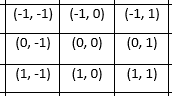
Try to visualize the matrix as a spherical one, rather than a flat one, so that after we reach one end, we can start over again. Meaning, if we are at (0, -1), and then we need to go to further left, we should get (0, 1).
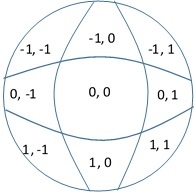
Assume that we are in the center most block, i.e. (0,0) coordinate. Now, we will change the frames according to the drag events.So the algorithm is:
- If the difference between current x-coordinate and initial x-coordinate is positive, it is a bottom to top spin, i.e, (1, 0)
- If the difference between current x-coordinate and initial x-coordinate is negative, it is a top to bottom spin, i.e, (-1, 0)
- If the difference between current y-coordinate and initial y-coordinate is positive, it is a left to right spin, i.e, (0, -1)
- If the difference between current y-coordinate and initial y-coordinate is negative, it is a right to left spin, i.e, (0,1)
It’s makes our lives much simpler and easier. Only thing, we need to be aware of is our current coordinate, and change the x and y coordinates by adding or subtracting, based on the event.
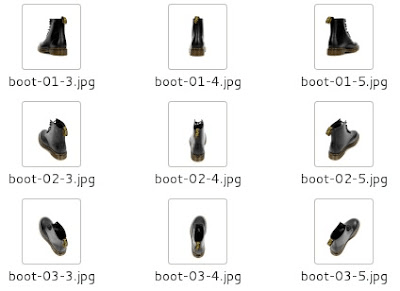
Let’s have a look at the HTML now.
<!DOCTYPE html>

<html>
<head>
<title>Spin 360</title>
</head>
<!-- 360 deg view of product -->
<body>
<div >
<link href="css/spin.css" rel="stylesheet" type="text/css" />
<div id="holder">
  <div id="row1">
    <img src="images/boot/boot-01-1.jpg" class="show" />
    <img src="images/boot/boot-01-2.jpg" class="hide" />
    <img src="images/boot/boot-01-3.jpg" class="hide" />
    <img src="images/boot/boot-01-4.jpg" class="hide" />
    <img src="images/boot/boot-01-5.jpg" class="hide" />
    <img src="images/boot/boot-01-5.jpg" class="hide" />
    <img src="images/boot/boot-01-6.jpg" class="hide" />
    <img src="images/boot/boot-01-7.jpg" class="hide" />
    <img src="images/boot/boot-01-8.jpg" class="hide" />
    <img src="images/boot/boot-01-9.jpg" class="hide" />
    <img src="images/boot/boot-01-10.jpg" class="hide" />
    <img src="images/boot/boot-01-11.jpg" class="hide" />
    <img src="images/boot/boot-01-12.jpg" class="hide" />
  </div>
  <div id="row2">
    <img src="images/boot/boot-02-1.jpg" class="hide" />
    <img src="images/boot/boot-02-2.jpg" class="hide" />
    <img src="images/boot/boot-02-3.jpg" class="hide" />
    <img src="images/boot/boot-02-4.jpg" class="hide" />
    <img src="images/boot/boot-02-5.jpg" class="hide" />
    <img src="images/boot/boot-02-5.jpg" class="hide" />
    <img src="images/boot/boot-02-6.jpg" class="hide" />
    <img src="images/boot/boot-02-7.jpg" class="hide" />
    <img src="images/boot/boot-02-8.jpg" class="hide" />
    <img src="images/boot/boot-02-9.jpg" class="hide" />
    <img src="images/boot/boot-02-10.jpg" class="hide" />
    <img src="images/boot/boot-02-11.jpg" class="hide" />
    <img src="images/boot/boot-02-12.jpg" class="hide" />
  </div>
  <div id="row3">
    <img src="images/boot/boot-03-1.jpg" class="hide" />
    <img src="images/boot/boot-03-2.jpg" class="hide" />
    <img src="images/boot/boot-03-3.jpg" class="hide" />
    <img src="images/boot/boot-03-4.jpg" class="hide" />
    <img src="images/boot/boot-03-5.jpg" class="hide" />
    <img src="images/boot/boot-03-5.jpg" class="hide" />
    <img src="images/boot/boot-03-6.jpg" class="hide" />
    <img src="images/boot/boot-03-7.jpg" class="hide" />
    <img src="images/boot/boot-03-8.jpg" class="hide" />
    <img src="images/boot/boot-03-9.jpg" class="hide" />
    <img src="images/boot/boot-03-10.jpg" class="hide" />
    <img src="images/boot/boot-03-11.jpg" class="hide" />
    <img src="images/boot/boot-03-12.jpg" class="hide" />
  </div>
  <div id="row4">
    <img src="images/boot/boot-04-1.jpg" class="hide" />
    <img src="images/boot/boot-04-2.jpg" class="hide" />
    <img src="images/boot/boot-04-3.jpg" class="hide" />
    <img src="images/boot/boot-04-4.jpg" class="hide" />
    <img src="images/boot/boot-04-5.jpg" class="hide" />
    <img src="images/boot/boot-04-5.jpg" class="hide" />
    <img src="images/boot/boot-04-6.jpg" class="hide" />
    <img src="images/boot/boot-04-7.jpg" class="hide" />
    <img src="images/boot/boot-04-8.jpg" class="hide" />
    <img src="images/boot/boot-04-9.jpg" class="hide" />
    <img src="images/boot/boot-04-10.jpg" class="hide" />
    <img src="images/boot/boot-04-11.jpg" class="hide" />
    <img src="images/boot/boot-04-12.jpg" class="hide" />
  </div>
</div>
http://script/spin3D.js
</div>
</body>
</html> Wisdombox